Data Manager is the Zendesk admin tool you've been missing. Click any trigger, automation, or macro and see exactly which tickets it fired on. Audit your business rules with usage counts at a glance. Browse Users and Organizations as a sortable spreadsheet, every custom field included.
Built for the Zendesk admin who's been asked one too many times "is this trigger even doing anything?" Data Manager answers that question — and a dozen others — in seconds.
Click any column header to sort ascending or descending. Works for text, dates, numbers — and even custom fields.
Grab any column header and drop it where you want. Arrange your columns the way your brain works.
Pick exactly which columns appear. Hide the noise, focus on what matters for the task in front of you.
Save "Enterprise Accounts," "New Signups," or "Churned Users" as one-click layouts. Rename and delete anytime.
Live search filters across every field — standard fields, custom fields, tags, emails, domains, notes.
Export your current view or just the rows you've selected. Perfect for audits, reporting, and handoffs.
All active user and organization custom fields appear automatically, tagged with a "CF" badge. No config needed.
Select specific rows with checkboxes. Export only what's selected, or save selection as a starting point.
Every trigger in your account, in one sortable table. With category, description, status, and 1h / 24h / 7d / 30d firing counts. Built for quarterly reviews.
See every automation in your account at a glance — status, descriptions, and usage stats. Find and clean up rules that haven't fired in 30 days.
All macros in a sortable view. Descriptions, categories, update history. Spot duplicates and outdated templates before they confuse your agents.
Click any trigger to see exactly which tickets it fired on. With ticket links, subjects, and timestamps. Solves a problem Zendesk has no native answer for.
Same drill-down for macros and automations. See where every rule actually touched your customer experience — perfect for compliance audits.
One-click CSV from any drill-down result. Hand it to compliance, paste it into a postmortem, or share with your team. Real audit evidence in seconds.
Audit your triggers. Browse every custom field as a column. Save the layouts you use most. Export the CSV your team needs. One app, every angle.
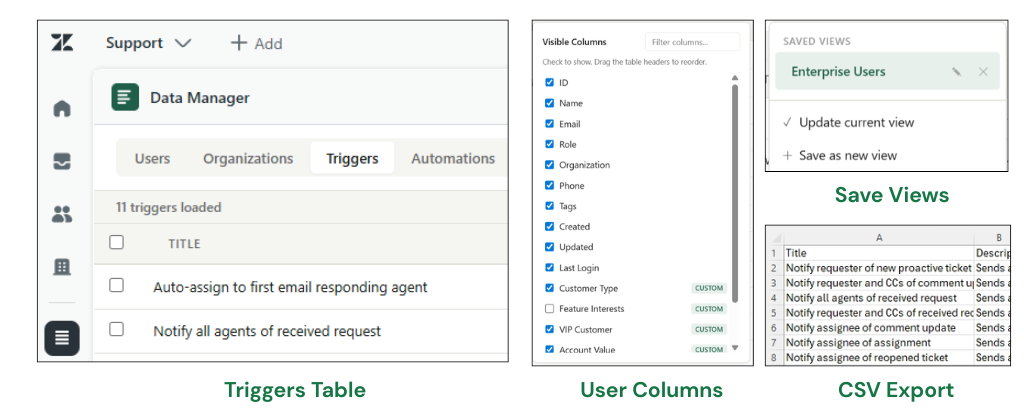
Multiple tabs, real screenshots — Triggers tab, custom field columns, Saved Views, and CSV export, all shown here exactly as they look in your Zendesk.
Pick the plan that matches how deep you go on audits. All plans bill per Zendesk account, not per agent.
Spreadsheet view of your users and orgs.
Audit your business rules.
See real ticket impact for every rule.
Cancel anytime · No per-agent fees · Billed through Zendesk Marketplace
Free is fully functional with no time limit, no credit card, no caps. Upgrade to Pro or Auditor from inside the app whenever you're ready.
Install on Zendesk MarketplaceTier upgrades available from inside the app once installed.
Yes. The Users and Organizations tables, search, sort, drag-drop, saved views, and CSV export are all free forever. No trial, no credit card, no caps. Pro ($7/month) unlocks the Triggers, Automations, and Macros audit tabs with usage stats inline. Auditor ($12/month) adds drill-down — click any rule to see exactly which tickets it fired on, with one-click CSV export.
On the Free and Pro plans, no — the app runs entirely inside your Zendesk instance. Your users, organizations, custom fields, and rule definitions never leave your Zendesk account.
The Auditor plan uses a small backend to power drill-down — when you click a rule, our backend briefly fetches the matching tickets from Zendesk on your behalf. We do not maintain a long-term database of your ticket events, and we never receive ticket comments, attachments, or end-user replies. Full details in our Privacy Policy.
Yes. Data Manager is built read-only by design — we cannot modify your Zendesk data, ever, even on the Auditor plan. The Free and Pro plans never send your data outside Zendesk at all.
The Auditor plan uses a small backend to power rule drill-down. Your authorization tokens are encrypted at rest with a dedicated encryption key, all traffic is TLS-encrypted, drill-down results are automatically deleted within minutes of use, and we never receive ticket comments, attachments, or end-user replies. Full details in our Privacy Policy.
Any Zendesk Support plan that supports apps — that's most paid plans. If you can install apps from the Marketplace, Data Manager works.
No. Data Manager only loads data when you open it, and only reads — never writes. It uses standard Zendesk API endpoints with adaptive pacing that respects rate limits.
Data Manager is built for typical small-to-mid Zendesk accounts. Larger accounts will load progressively — the app paces itself under Zendesk's API rate limits so it never freezes. Use search to narrow to what you need.
No, by design. Data Manager is a read-only audit and visibility tool. We don't offer bulk modification features because of the risk of accidentally damaging customer data. If you need bulk edits, Zendesk's native CSV import or the API are still your best options.
Agile Plan Group — we're Zendesk optimization consultants who kept running into the same audit and data-review pain in every engagement. We built the tool we wished existed and kept the core features free for every admin.
Install Data Manager free from the Zendesk Marketplace. 60 seconds, no config.
Get it on the Zendesk Marketplace →